Password Field
The password field is a text field for secrets. It hides the input and lets the user reveal it. Never send a stored secret back to the browser: only fill in a value which the user has just entered.
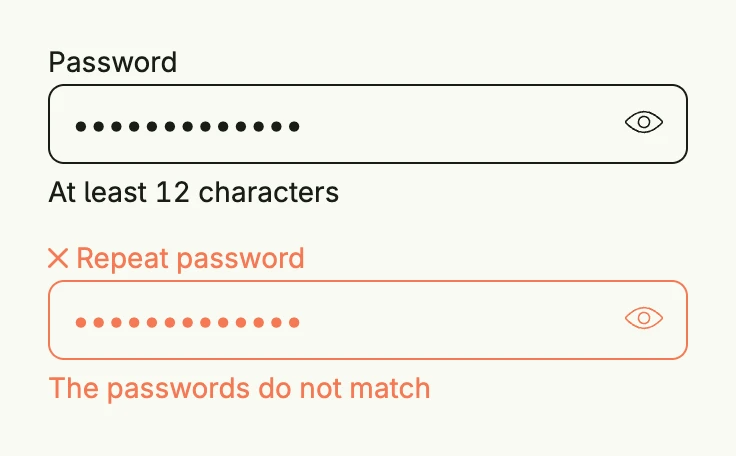
func view(wnd core.Window) core.View {
    password := core.AutoState[string](wnd).Init(func() string { return "correct horse" })
    repeated := core.AutoState[string](wnd).Init(func() string { return "correct house" })

    return VStack(
        PasswordField("Password", password.Get()).
            InputValue(password).
            SupportingText("At least 12 characters").
            FullWidth(),
        PasswordField("Repeat password", repeated.Get()).
            InputValue(repeated).
            ErrorText("The passwords do not match").
            FullWidth(),
    ).Gap(L16).Frame(Frame{Width: L320})
}
Constructors
func PasswordField(label string, value string) TPasswordFieldPasswordField represents a secret entered by the user.
Methods
| Method | Description |
|---|---|
AccessibilityLabel(label string) DecoredView | AccessibilityLabel sets an accessibility label for screen readers. |
AutoComplete(autoComplete bool) TPasswordField | AutoComplete enables or disables browser autocomplete for the field. |
Autocomplete(tags string) TPasswordField | Autocomplete defines the autocomplete tags of the input |
Border(border Border) DecoredView | Border sets the border styling of the field. |
Debounce(enabled bool) TPasswordField | Debounce is enabled by default. |
DebounceTime(d time.Duration) TPasswordField | DebounceTime sets a custom debouncing time when entering text. |
Disabled(disabled bool) TPasswordField | Disabled enables or disables the field. |
ErrorText(text string) TPasswordField | ErrorText sets the error message displayed when validation fails. |
Frame(frame Frame) DecoredView | Frame sets the layout frame for the field. |
FullWidth() TPasswordField | FullWidth expands the field to take up the full available width. |
ID(id string) TPasswordField | ID sets a unique identifier for the field. |
InputValue(input *core.State[string]) TPasswordField | InputValue binds the password field to the given state for two-way data binding. |
KeydownEnter(fn func()) TPasswordField | KeydownEnter sets a callback function to be triggered when the Enter key is pressed. |
Label(label string) | Label sets the field label. |
Lines(lines int) TPasswordField | Lines are by default at 0 and enforces a single line text field. |
Padding(padding Padding) DecoredView | Padding sets the padding around the field. |
Style(s TextFieldStyle) TPasswordField | Style sets the wanted style. |
SupportingText(text string) TPasswordField | SupportingText sets helper text displayed below the field. |
Value(value string) TPasswordField | Value sets the initial value of the password field. |
Visible(v bool) DecoredView | Visible sets the field’s visibility. |
WithFrame(fn func(Frame) Frame) DecoredView | WithFrame applies a transformation function to the field’s frame. |
Related
- Text Field
- Form
- Tutorial tutorial-12-textfield