Screen
editor.Screen is the full window layout of an editor, as used by the CMS: a header, a narrow navbar
with tool buttons, tool windows at the leading or trailing side, the content area and modals. The navbar
buttons usually toggle the visibility of the tool windows.
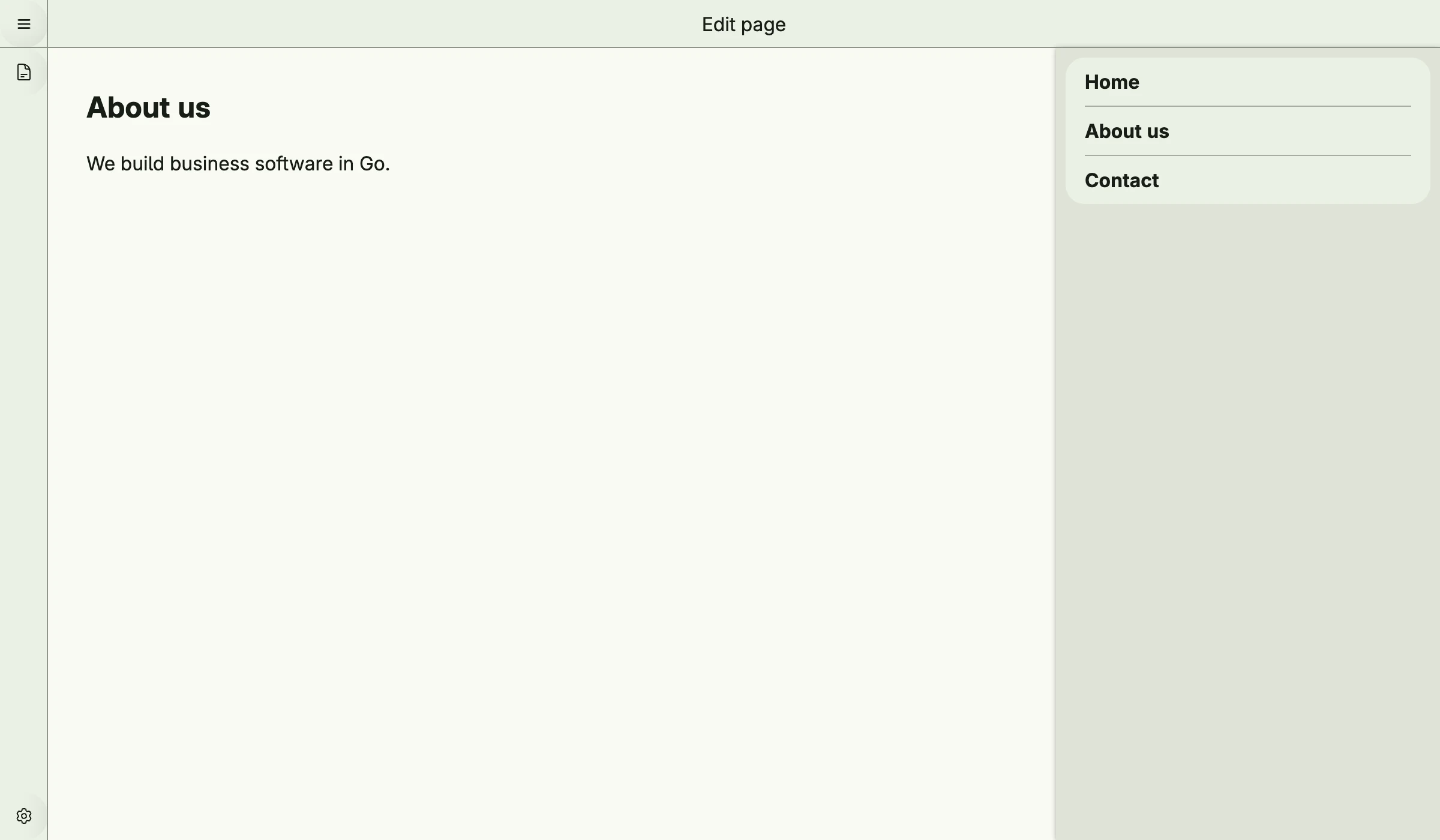
func view(wnd core.Window) core.View {
    pagesVisible := core.AutoState[bool](wnd).Init(func() bool { return true })

    pages := editor.ToolWindow(icons.DocumentText, "Pages").
        Content(VStack(
            list.List(
                list.Entry().Headline("Home"),
                list.Entry().Headline("About us"),
                list.Entry().Headline("Contact"),
            ).FullWidth(),
        ).FullWidth().Padding(Padding{}.All(L8))).
        Visible(pagesVisible.Get())

    return editor.Screen("Pages").
        Header(editor.Header(wnd).Center(Text("Edit page"))).
        Navbar(editor.Navbar().
            Top(TertiaryButton(func() {
                pagesVisible.Set(!pagesVisible.Get())
            }).PreIcon(icons.DocumentText)).
            Bottom(TertiaryButton(nil).PreIcon(icons.Cog6Tooth)),
        ).
        TrailingToolWindow(pages).
        Content(editor.Content(
            VStack(
                Text("About us").Font(Title),
                Text("We build business software in Go."),
            ).Alignment(Leading).Gap(L16),
        ).Style(editor.ContentPage))
}
editor.Header(wnd) creates the header with a menu button to go back, editor.Content(view) the content
area, either full size (ContentFull) or as a page (ContentPage). editor.ToolWindowList creates a tool
window with a list of entities, including create, select and delete.
Constructors
Screen
func Screen(title string) TScreenScreen creates a new TScreen with the given title.
Header
func Header(wnd core.Window) THeaderHeader creates a new THeader for the given window. By default, it includes a menu button in the leading corner with a “Back” navigation item.
Content
func Content(view core.View) TContentContent creates a new TContent with the given view.
Navbar
func Navbar() TNavbarNavbar creates a new TNavbar with visibility enabled by default.
Tool Window
func ToolWindow(icon core.SVG, name string) TVToolWindowToolWindow creates a new TVToolWindow with the given icon and name.
func ToolWindowList[T data.Aggregate[ID], ID data.IDType](wnd core.Window, cfg ToolWindowListConfig[T, ID]) TVToolWindowToolWindowList creates a TVToolWindow that displays a list of items based on the provided configuration.
Methods
Screen
| Method | Description |
|---|---|
Content(content TContent) TScreen | Content sets the main content area of the screen. |
Header(header THeader) TScreen | Header sets the header section of the screen. |
LeadingToolWindows(leading ...TVToolWindow) TScreen | LeadingToolWindows sets the leading-side tool windows of the screen. |
Modals(modals ...core.View) TScreen | Modals sets the modal dialogs of the screen. |
Navbar(navbar TNavbar) TScreen | Navbar sets the navigation bar of the screen. |
TrailingToolWindow(tailing TVToolWindow) TScreen | TrailingToolWindow sets the trailing-side tool window of the screen. |
Header
| Method | Description |
|---|---|
Center(views ...core.View) THeader | Center sets the center region of the header to the given views. |
Leading(views ...core.View) THeader | Leading sets the leading region of the header to the given views. |
Content
| Method | Description |
|---|---|
Style(style ContentStyle) TContent | Style applies the given ContentStyle to the TContent: ContentFull or ContentPage. |
Navbar
| Method | Description |
|---|---|
Bottom(views ...core.View) TNavbar | Bottom sets the bottom section of the navbar to the given views. |
Top(views ...core.View) TNavbar | Top sets the top section of the navbar to the given views. |
Tool Window
| Method | Description |
|---|---|
Bottom(v ui.DecoredView) TVToolWindow | Bottom sets the bottom section of the tool window to the given view. |
Content(v ui.DecoredView) TVToolWindow | Content sets the main content section of the tool window to the given view. |
Top(v ui.DecoredView) TVToolWindow | Top sets the top section of the tool window to the given view. |
Visible(b bool) TVToolWindow | Visible sets the visibility state of the tool window. |