Time Picker
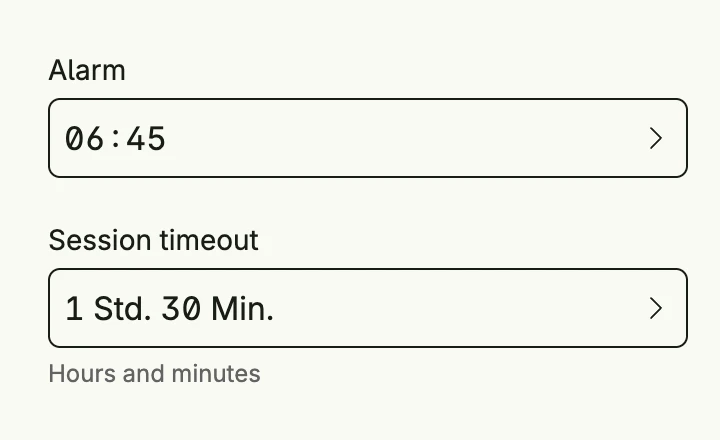
timepicker.Picker edits a time.Duration, either as a clock time (ClockFormat, e.g. 06:45) or
decomposed into days, hours, minutes and seconds (DecomposedFormat). Choose the visible units with
Days, Hours, Minutes and Seconds.
func view(wnd core.Window) core.View {
    alarm := core.AutoState[time.Duration](wnd).Init(func() time.Duration {
        return 6*time.Hour + 45*time.Minute
    })
    timeout := core.AutoState[time.Duration](wnd).Init(func() time.Duration {
        return 1*time.Hour + 30*time.Minute
    })

    return VStack(
        timepicker.Picker("Alarm", alarm).
            Format(timepicker.ClockFormat).
            Frame(Frame{}.FullWidth()),
        timepicker.Picker("Session timeout", timeout).
            Format(timepicker.DecomposedFormat).
            Days(false).Seconds(false).
            SupportingText("Hours and minutes").
            Frame(Frame{}.FullWidth()),
    ).Gap(L16).Frame(Frame{Width: L320})
}
Constructors
func Picker(label string, selectedState *core.State[time.Duration]) TPickerPicker renders a time.Duration either in clock time format or in decomposed format.
Methods
| Method | Description |
|---|---|
AccessibilityLabel(label string) ui.DecoredView | AccessibilityLabel sets a label used by screen readers for accessibility. |
Border(border ui.Border) ui.DecoredView | Border sets the border style of the time picker. |
Days(showDays bool) TPicker | Days toggles whether the picker allows selecting days. |
Disabled(disabled bool) TPicker | Disabled enables or disables user interaction with the time picker. |
ErrorText(text string) TPicker | ErrorText sets the validation or error message displayed below the picker. |
Format(format PickerFormat) TPicker | Format sets the display format for the duration value (clock or decomposed). |
Frame(frame ui.Frame) ui.DecoredView | Frame sets the layout frame of the time picker, including size and positioning. |
Hours(showHours bool) TPicker | Hours toggles whether the picker allows selecting hours. |
Minutes(showMinutes bool) TPicker | Minutes toggles whether the picker allows selecting minutes. |
Padding(padding ui.Padding) ui.DecoredView | Padding sets the inner spacing around the time picker content. |
Seconds(showSeconds bool) TPicker | Seconds toggles whether the picker allows selecting seconds. |
SupportingText(text string) TPicker | SupportingText sets helper or secondary text displayed below the picker label. |
Title(title string) TPicker | Title sets the title of the picker, typically shown in dialogs. |
Visible(visible bool) ui.DecoredView | Visible controls the visibility of the time picker; setting false hides it. |
WithFrame(fn func(ui.Frame) ui.Frame) ui.DecoredView | WithFrame applies a transformation function to the picker’s frame and returns the updated component. |