Table Cell
A table cell holds the content of one cell in a table row. It can span several columns or rows, and set its own alignment, background, padding, border and click action. The Table page describes the table itself.
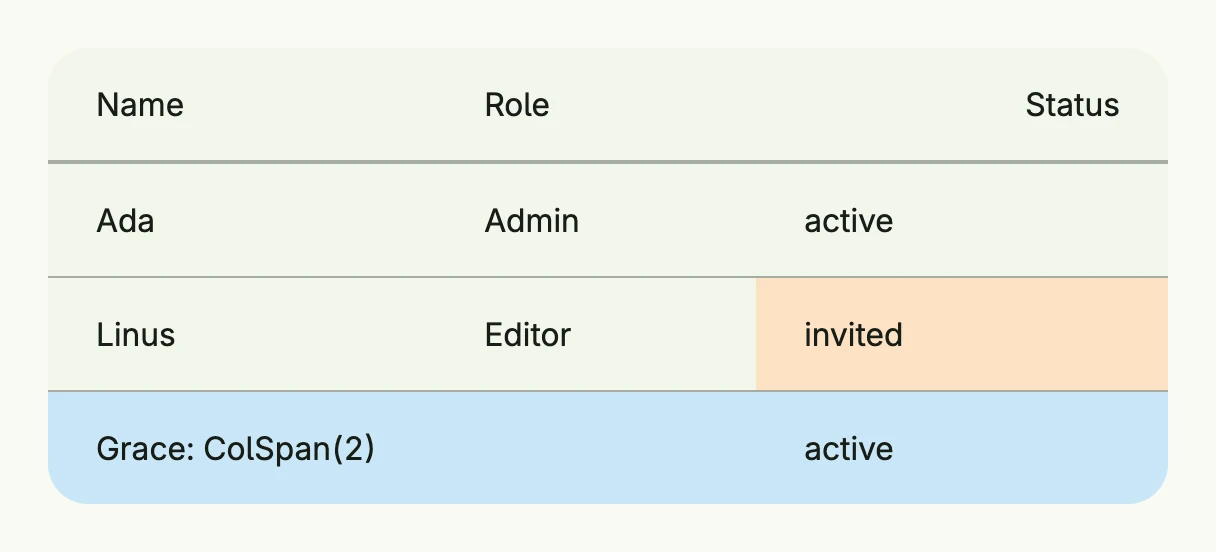
return Table(
	TableColumn(Text("Name")),
	TableColumn(Text("Role")).Width(L160),
	TableColumn(Text("Status")).Alignment(Trailing),
).Rows(
	TableRow(
		TableCell(Text("Ada")),
		TableCell(Text("Admin")),
		TableCell(Text("active")),
	),
	TableRow(
		TableCell(Text("Linus")),
		TableCell(Text("Editor")),
		TableCell(Text("invited")).BackgroundColor("#FDE2C4"),
	).HoveredBackgroundColor(ColorCardFooter),
	TableRow(
		TableCell(Text("Grace: ColSpan(2)")).ColSpan(2),
		TableCell(Text("active")),
	).BackgroundColor("#C9E7F8"),
).Frame(Frame{Width: L560})
Constructors
| Constructor | Description |
|---|---|
TableCell(content core.View) TTableCell | Creates a new table cell with the given content. |
Methods
| Method | Description |
|---|---|
Action(action func()) TTableCell | Sets an optional click/tap action for the cell. |
Alignment(alignment Alignment) TTableCell | Sets the alignment for the cell content. |
BackgroundColor(backgroundColor Color) TTableCell | Sets the background color of the cell. |
Border(border Border) TTableCell | Sets the border of the cell. |
ColSpan(colSpan int) TTableCell | Sets how many columns this cell spans. |
Content(content core.View) TTableCell | Replaces the content of the cell. |
HoveredBackgroundColor(backgroundColor Color) TTableCell | Sets the background color when the cell is hovered. |
Key(name, id string) TTableCell | Identifies the action across renders by what it acts on, e.g. (column, rowID). |
Padding(padding Padding) TTableCell | Sets the padding of the cell. |
RowSpan(rowSpan int) TTableCell | Sets how many rows this cell spans. |
Related
- Table, Table Row, Table Column
- Tutorials: Table