TwoColumn
The two-column layout of package navsplitview
shows a list (content) next to the details of the selected entry (detail), like a mail client. The selection is
kept in the query parameters of the current page, so it survives reloads and works with the browser’s back button.
On small and medium windows only one column is shown at a time, with a back button on the detail.
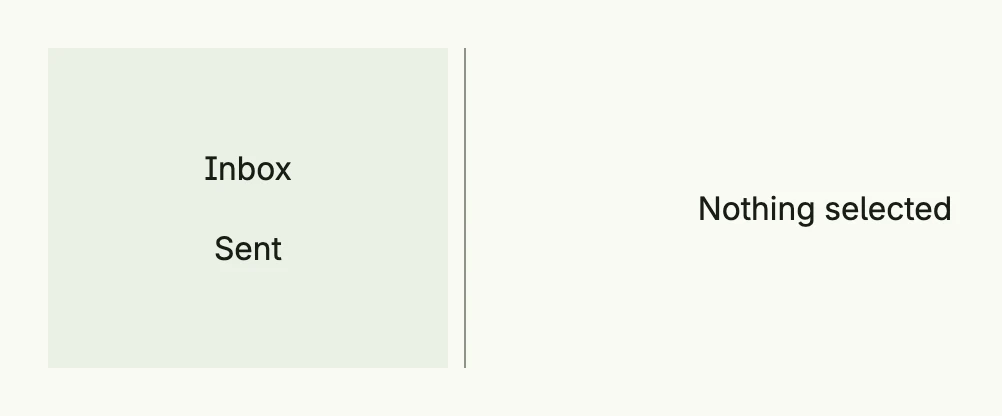
return navsplitview.TwoColumn(navsplitview.NavLinks{
	"list": VStack(
		navsplitview.ListItem(navsplitview.KindDetail, "inbox", Text("Inbox")),
		navsplitview.ListItem(navsplitview.KindDetail, "sent", Text("Sent")),
	).FullWidth(),
	"none":  Text("Nothing selected"),
	"inbox": Text("3 new messages"),
	"sent":  Text("No messages sent yet"),
}).Default("list", "none").
	WidthContent(L200).
	BackgroundColorContent(ColorCardBody).
	Frame(Frame{Width: L560, Height: L160})
Each column shows a view identified by a ViewID. The factory creates the view for an ID: NavLinks maps IDs to
views, NavFnLinks maps them to functions which are only called when needed, and NavFn is a single function.
ListItem opens a view in the given column when it is clicked; NavigateContent and NavigateDetail do the
same from code. If you use more than one split view on a page, give each an ID and set it as Prefix of its
list items.
Constructors
| Constructor | Description |
|---|---|
navsplitview.TwoColumn(nav Factory) TTwoColumn | Creates a two-column layout whose views are created by the factory. |
navsplitview.ListItem(kind TargetKind, target ViewID, content core.View) TListItem | Creates a clickable entry which shows target in the column KindContent or KindDetail. |
Methods
TTwoColumn:
| Method | Description |
|---|---|
AlignmentContent(alignment ui.Alignment) TTwoColumn | Sets the alignment of the content column, Center by default. |
AlignmentDetail(alignment ui.Alignment) TTwoColumn | Sets the alignment of the detail column, Top by default, so the detail does not jump when the selection changes between a long and a short view. |
BackgroundColorContent(bg ui.Color) TTwoColumn | Sets the background color of the content column. |
BackgroundColorDetail(bg ui.Color) TTwoColumn | Sets the background color of the detail column. |
Default(content, detail ViewID) TTwoColumn | Sets the views shown when nothing is selected. |
Frame(frame ui.Frame) TTwoColumn | Sets the frame of the layout. |
FullWidth() TTwoColumn | Sets the width to the full available width. |
ID(id string) TTwoColumn | Sets the ID which distinguishes several split views on one page. |
WidthContent(width ui.Length) TTwoColumn | Sets the width of the content column, 30rem by default. |
WidthDetail(width ui.Length) TTwoColumn | Sets the width of the detail column, the remaining space by default. |
The alignment setters only take effect on large windows, where both columns are shown side by side.
TListItem:
| Method | Description |
|---|---|
DeleteTarget(kind TargetKind) TListItem | Clears the selection of the given column when the item is clicked. |
Frame(frame ui.Frame) TListItem | Sets the frame of the item, full width by default. |
Prefix(id string) TListItem | Sets the ID of the split view the item belongs to. |
Related
- ThreeColumn, Split View, List
- Tutorials: Navigation split view