Padding
A Padding is the space between the edge of a component and its content, defined per side. Start with the zero
value and use the setters, or set the fields Top, Left, Right and Bottom directly.
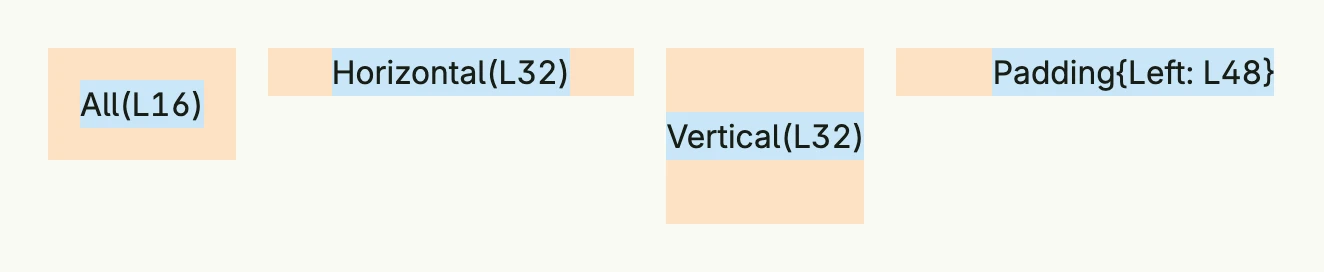
return HStack(
	VStack(Text("All(L16)").BackgroundColor("#C9E7F8")).
		BackgroundColor("#FDE2C4").
		Padding(Padding{}.All(L16)),
	VStack(Text("Horizontal(L32)").BackgroundColor("#C9E7F8")).
		BackgroundColor("#FDE2C4").
		Padding(Padding{}.Horizontal(L32)),
	VStack(Text("Vertical(L32)").BackgroundColor("#C9E7F8")).
		BackgroundColor("#FDE2C4").
		Padding(Padding{}.Vertical(L32)),
	VStack(Text("Padding{Left: L48}").BackgroundColor("#C9E7F8")).
		BackgroundColor("#FDE2C4").
		Padding(Padding{Left: L48}),
).Gap(L16).Alignment(Top)
The orange area is the padding of each stack, the blue area its content.
Methods
| Method | Description |
|---|---|
All(pad Length) Padding | Applies the same padding value to all four sides. |
Horizontal(pad Length) Padding | Sets the padding for the horizontal axis (left and right). |
Vertical(pad Length) Padding | Sets the padding for the vertical axis (top and bottom). |
The setters can be combined: Padding{}.Horizontal(L16).Vertical(L8).
Related
- Length, Frame, Space
- Tutorials: Combining views, Box