Tabs
Tabs of package tabs show a row of tab
buttons and the content of the active page. Only the active page is built, because each page creates
its content in a function.
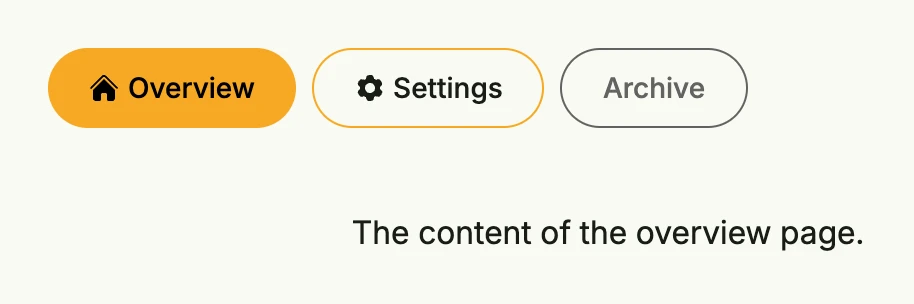
return tabs.Tabs(
	tabs.Page("Overview", func() core.View {
		return Text("The content of the overview page.")
	}).Icon(icons.Home),
	tabs.Page("Settings", func() core.View {
		return Text("The content of the settings page.")
	}).Icon(icons.Cog6Tooth),
	tabs.Page("Archive", func() core.View {
		return Text("Not available yet.")
	}).Disabled(true),
).InputValue(core.AutoState[int](wnd)).
	Frame(Frame{Width: L560})
The state holds the index of the active page. With tabs.NewIndexState(wnd, name) the index is kept in the query
parameter <name>-idx, so the active tab survives reloads and can be linked.
Constructors
| Constructor | Description |
|---|---|
tabs.Tabs(pages ...TPage) TTabs | Creates a new tab container with the given pages, defaulting to leading alignment and a standard page-to-tab spacer. |
tabs.NewIndexState(wnd core.Window, name string) *core.State[int] | Creates an index state which is passed through the query parameter <name>-idx. |
Methods
| Method | Description |
|---|---|
ButtonAlignment(tabAlignment ui.Alignment) TTabs | Sets the alignment of the tab buttons within the button bar. |
Frame(frame ui.Frame) TTabs | Sets the layout frame of the tabs container, including size and spacing. |
FullWidth() TTabs | Sets the tabs container to span the full available width. |
InputValue(activeIdx *core.State[int]) TTabs | Binds the tab container to an external state that tracks the index of the currently active page. |
PageTabSpace(space ui.Length) TTabs | Sets the space between the tab button bar and the page content, L32 by default; "" disables it. |
Position(pos ui.Position) TTabs | Sets the position of the tabs container. |